
An add-on for the free Rapls Copy Notice
Which paragraph was copied?
See it in your team chat, and in numbers.
Rapls Copy Notice Pro builds on the free plugin’s log. It adds statistics compared with the previous period, notifications to Slack, Chatwork, Discord or a webhook, routing rules with a burst alert, repost detection and CSV export. One-time purchase, from $15 for one site.
14-day money-back guarantee (refund policy) | GPL v2 or later
- Sends nothing until you switch it on
- One-time purchase, no subscription
- Only the outside services you add
- Your log survives any licence change
[Sample Kitchen] 2 copies detected
Keep the salt above 18%, and start with a weight twice that of the plums.
who it is for
If email notifications are enough for you, the free plugin is all you need.
The free plugin records copies and emails you about them, start to finish. Pro is useful when you want to share that record with other people, or look at the trend and act on it.
You want notifications in your team chat
Several people run the site, and Slack or Chatwork gets read sooner than email.
You want to know which paragraphs get taken
Counts by post and by paragraph, side by side with the previous period.
You can’t search the web for reposts every day
Have the most copied paragraphs searched for automatically, up to a limit you set.
You look after more than one site
Client sites, or a multisite network.
free + pro
The free plugin is complete on its own.
Pro only adds to it.
Pro is a separate plugin and takes nothing away from the free one. If Pro is stopped or removed, the free plugin’s log and email notifications carry on as before.
Records copies and emails you
- A log of copied text, post, shortened IP address and browser
- Plain-text email: an hourly summary, or one per copy
- Minimum length, post types, ignored IP addresses and posts
- Paragraph fingerprints, so copies of one paragraph are listed together
- Dashboard widget and Site Health checks
- No cookies, no outside services, records deleted after 90 days
Share, compare and search
- Statistics: 7, 30 or 90 days against the previous period, by post and by paragraph
- Channels: Slack, Chatwork, Discord and your own webhook
- Rules: route copies by post, category and length
- Burst alert: when one post is copied many times in a short time
- Repost detection with your own search API key, once a day (off by default)
- CSV export and a network screen for multisite
pro features
What Pro adds
Each feature is a new tab on the same screen as the free plugin (Tools → Rapls Copy Notice). The numbers below are defaults, and you can change them in the settings.
01 — STATISTICS
Statistics against the previous period
Copies per day for the last 7, 30 or 90 days, drawn over the period before it. The most copied posts are listed with their change, and opening a post shows its most copied paragraphs.
Top 20 posts and top 20 paragraphs / Chart.js bundled, nothing loaded from a CDN02 — CHANNELS
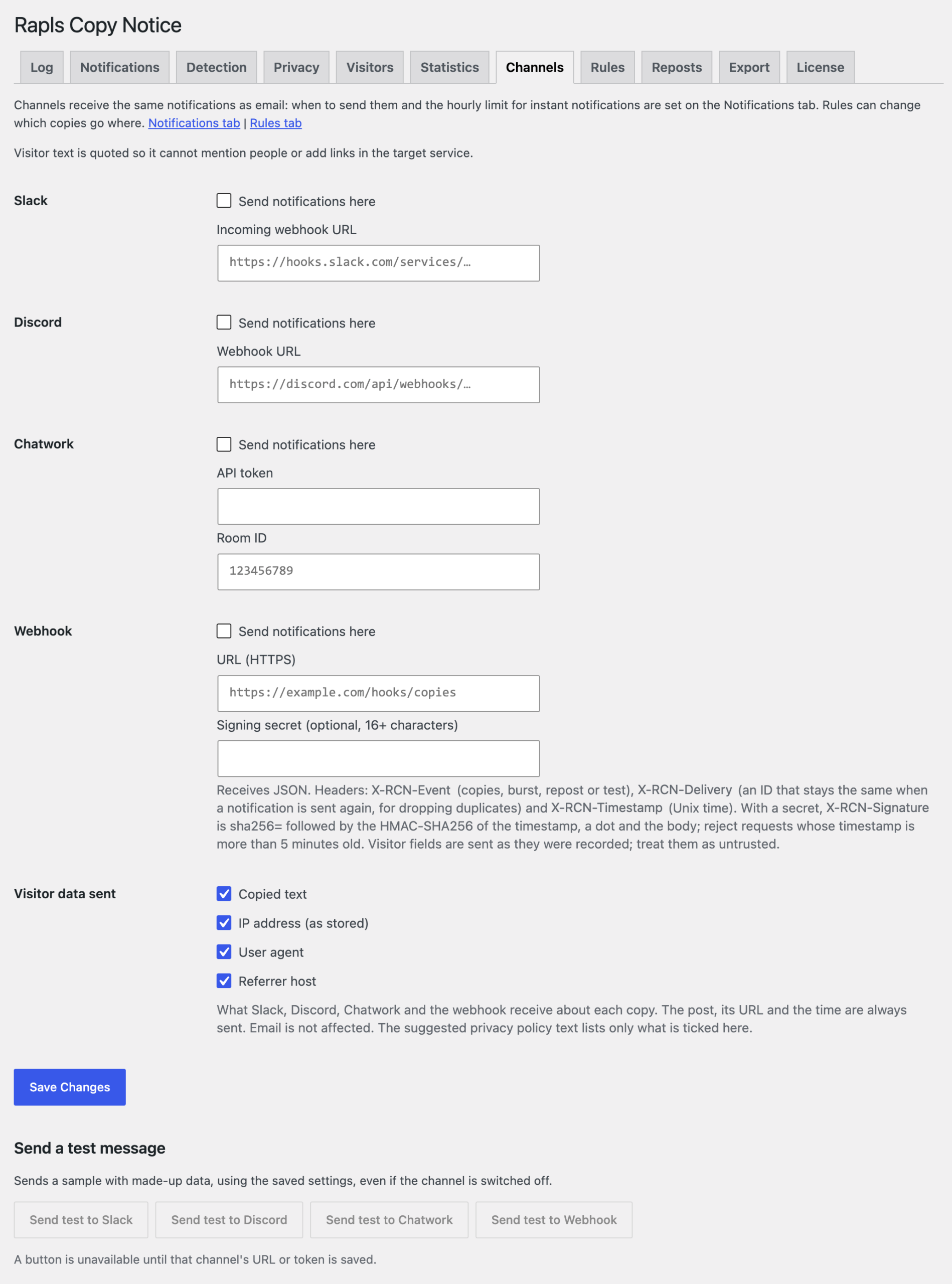
Chat and webhook notifications
Whenever the free plugin sends an email (hourly summary or instant), the channels you switched on get the same notification. Every channel has a test button. Failed deliveries are retried automatically, and a 30-day delivery history lets you send one again by hand. You choose which visitor data (copied text, IP, browser, referrer) they receive.
Slack / Chatwork / Discord / HTTPS webhook with a timestamped HMAC-SHA256 signature03 — RULES
Rules for where copies go
Match by post, category and length, then pick which of email and each channel receives the match. You can also send it nowhere. The copy is still recorded in the log.
Up to 20 rules / copies matching no rule go everywhere, or nowhere04 — BURST
When a post suddenly gets copied a lot
If one post is copied many times in a short time, you are told straight away instead of waiting for the summary. A cooldown stops repeat alerts about the same post. Off by default.
10+ copies in 10 minutes → alert / then quiet for 60 minutes for that post05 — REPOSTS
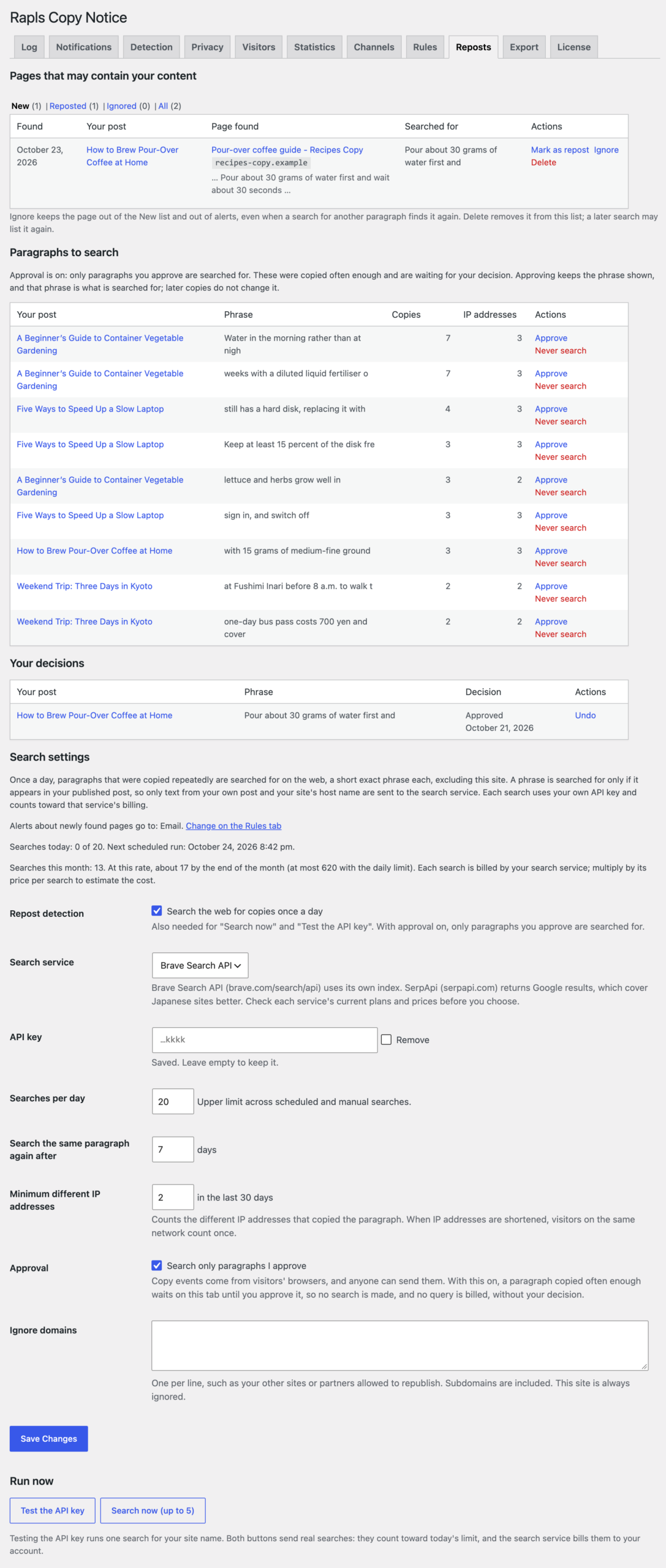
Search the web for copied paragraphs
Once a day, the opening words of paragraphs that were copied repeatedly are searched for on the web, and pages that may contain them are listed. You sort them into confirmed and ignored. Searches use your own API key, and by default only paragraphs you approve are searched for.
Brave Search API or SerpApi / off by default / approval first / details06 — EXPORT
CSV export
Pick a date range and, if you like, one post, and download the log as CSV. Cells that start with a risky character get an apostrophe in front, so a spreadsheet does not run them as formulas.
UTF-8 with BOM / cells starting with= + - @, a tab or a line break are neutralised 07 — MULTISITE
One licence for a whole network
Network-activate the free plugin and Pro, then manage the licence under Network Admin → Settings → Rapls Copy Notice Pro, where you also see copies per site. Each site keeps its own log and settings.
Multisite needs the 5-site licence (it covers every site in the network)08 — QUIET
Installing it sends nothing
Channels, the burst alert and repost detection are all off by default. Once saved, URLs, tokens and API keys are never shown in full again: you see the host name and the last four characters.
A channel without its credentials cannot be switched on09 — UPDATE
Updates in your dashboard
Updates appear on WordPress’s own Updates screen. A package is installed only when its SHA-256 checksum matches. The licence key travels in request headers, never in a URL.
Updates with no time limit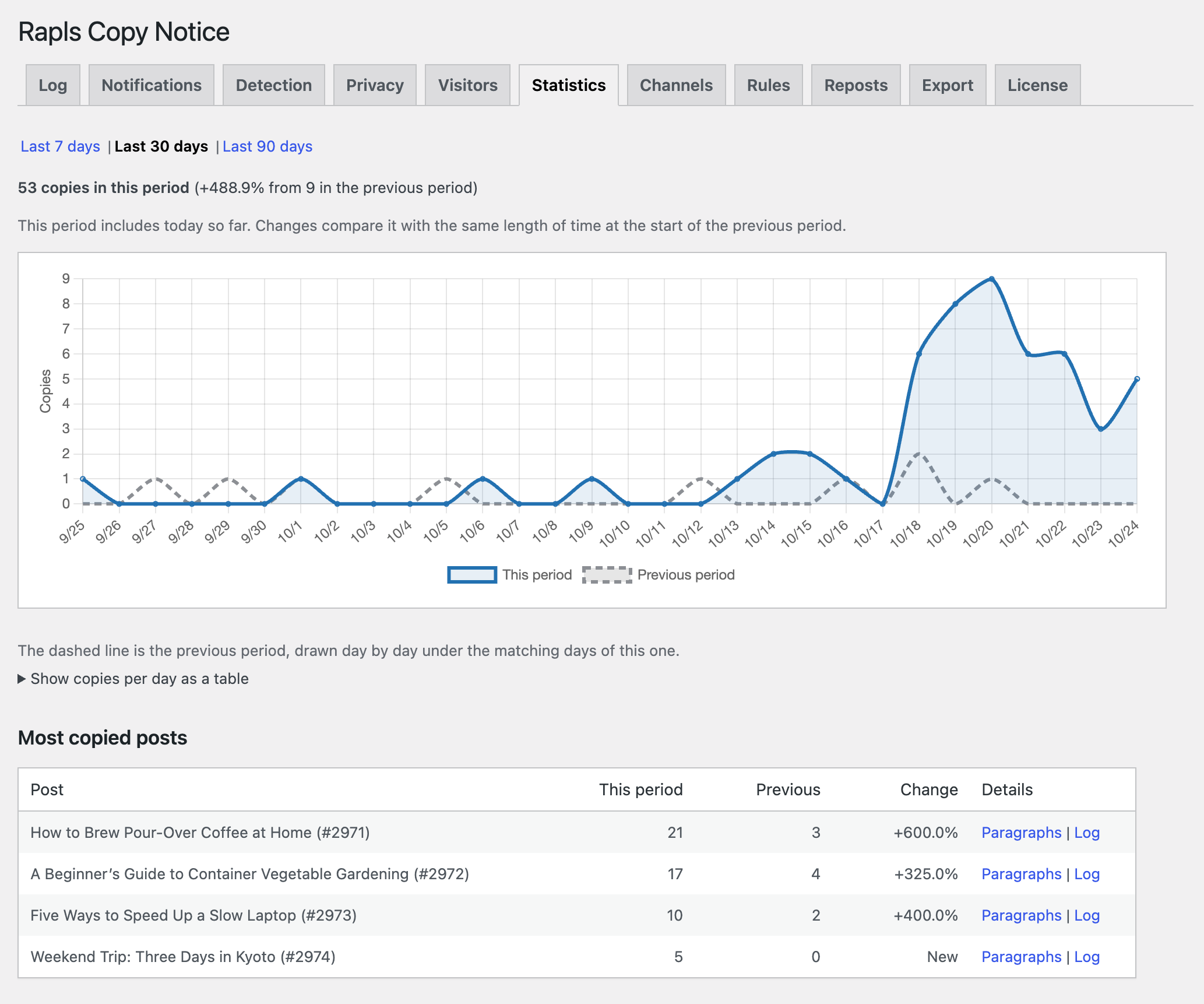
channels
Copied text is text a visitor sent you.
Each channel gets it neutralised for its own format.
The copied text, IP address, browser and referrer all come from the visitor’s browser. Passed straight to Slack, an @channel in the text could ping everyone, or turn into a link. Pro escapes each value for the format of the service it goes to, so that cannot happen.
| Channel | What happens to text that came from a visitor |
|---|---|
| Slack | &, < and > are sent as entities, so the text cannot mention @channel or a user, or form a link. Visitor values are shown as code. |
| Discord | Visitor values sit in code blocks or code spans, and mentions are switched off for every message. |
| Chatwork | Square brackets in visitor text are replaced with full-width brackets, so they cannot form [To:], [info] or other tags. |
| Webhook | Values are sent as recorded, in JSON; treat them as untrusted on the receiving side. Every request carries X-RCN-Delivery, the same on retries, and X-RCN-Timestamp; with a secret set, X-RCN-Signature: sha256=… (HMAC-SHA256 over the timestamp and the body) lets receivers drop duplicates and reject replayed requests. Only HTTPS URLs on public hosts are accepted, and redirects are not followed. |
| Plain text only, as in the free plugin. The subject is the site name, fixed wording and a count; nothing a visitor sent. | |
| Admin screens | Every value is escaped on output. Links to pages found by repost detection keep only http and https, and open with noopener noreferrer nofollow. |
What is sent: with a channel switched on, each notification sends that service the post title, URL and time and, by default, an excerpt of the copied text, the shortened IP address, the browser (user agent) and the referrer host. The excerpt, IP, browser and referrer can each be left out on the Channels tab. A burst alert sends the post title, URL and count; a repost alert sends the address and title of the page found. The privacy policy text the free plugin suggests (Settings → Privacy) names the services you switched on and what they receive.
repost detection
Repost detection is off by default.
When you use it, it runs on your own search API key.
Switched on, it searches the web once a day for the opening words of paragraphs that were copied repeatedly. The account with the search service, and its bill, belong to the site owner. Nothing goes through Rapls Works.
- Pick paragraphsParagraphs copied from at least two different IP addresses in the last 30 days, most copied first. By default only the ones you approve are searched for. A paragraph already searched is not searched again for 7 days.
- Make a phraseUp to 40 characters from the start of a recent copy whose text appears in the post. Phrases too short to be distinctive are skipped.
- SearchUsing the service you chose (Brave Search API or SerpApi), excluding your own site. The daily limit is 20 searches by default.
- List the resultsFound pages appear in the Reposts tab and an alert goes where your rules say. Confirm, ignore or delete each one.
SENTWhat the search service receives
- A phrase of up to 40 characters from your own published post
- Your site’s host name, to exclude it from results
- Your API key, to authenticate with that service
NOT SENTWhat it does not receive
- Anything about visitors: IP address, browser, referrer
- The full text of the post or of the paragraph
- Your licence key or email address
About cost: each search is billed to you by the search service you chose. Prices and free allowances differ between services and can change, so check each service’s pricing page. In Pro, “Searches per day” (default 20, range 1–200) caps the number of searches, and manual “Search now” runs count towards it. With approval on (the default), paragraphs you haven’t approved never cause a search.
Found pages are candidates: quotations and reposts you allowed show up the same way. Whether a page is a repost is your call. Put your other sites and partners in “Ignore domains” to keep them out of the results.
You approve before anything is searched: copy events come from visitors’ browsers, so anyone can send them. By default, paragraphs that meet the conditions wait on the Reposts tab, with the phrase that would be searched for, and only the ones you approve are searched for. Mark the ones you don’t need as “Never search”. Switch approval off in the settings to have them searched for automatically.
Paragraphs are identified by the paragraph fingerprints that the free plugin (1.2.0 or later) records on HTTPS pages. Sites served over plain HTTP, and copies made before 1.2.0, have no paragraph data, so they are left out of paragraph statistics and repost detection.
free vs pro
Free and Pro compared
The top half is all in the free plugin. It stays the same whether Pro is installed or not.
| Feature | Free | Pro |
|---|---|---|
| In the free plugin (unchanged with Pro) | ||
| Copy log (text, post, shortened IP, browser), filtering and deletion | ✓ | ✓ |
| Plain-text email notifications (hourly summary, or instant with a cap) | ✓ | ✓ |
| Minimum length, post types, ignored IPs and posts, administrators and editors ignored | ✓ | ✓ |
| Paragraph fingerprints and “Copies of this paragraph” | ✓ | ✓ |
| Dashboard widget and Site Health checks | ✓ | ✓ |
| Shortened IPs, retention (90 days by default), rate limits, works with page caching | ✓ | ✓ |
| Added by Pro | ||
| Statistics (7 / 30 / 90 days, against the previous period, by post and by paragraph) | — | ✓ |
| Slack, Chatwork, Discord and webhook notifications with test buttons | — | ✓ |
| Routing rules (post, category, length → channels) | — | ✓ |
| Burst alert | — | ✓ |
| Repost detection (your own Brave Search API or SerpApi key) | — | ✓ |
| CSV export (formula-safe) | — | ✓ |
| Multisite network screen (copies per site) | — | ✓ |
pricing
A one-time purchase. No subscription.
Pay once and keep using it. Updates have no time limit, and support is included for a year from purchase. Prices include tax.
Pro · 1 site
For your own site or blog
$15
One-time, tax included
- Every Pro feature
- Activate on one site
- Updates with no time limit, a year of support
Pro · 5 sites
For several sites, agencies and multisite
$35
One-time, tax included
- Every Pro feature
- Activate on up to five sites
- Needed for multisite (covers every site in the network)
After purchase, your licence key (starting with RCNP-) arrives by email. Enter it on the download page to get the ZIP. The free Rapls Copy Notice is on WordPress.org.
license
Pro stops only when the licence server clearly says the licence is not valid.
Pro checks with the licence server once a day. If the server cannot be reached, Pro keeps running.
STOPS
When it stops
Only when the server answers that the licence is no longer valid: after a refund, when a key is revoked, or on a site that holds no seat (a sixth site on a 5-site licence, for example).
KEEPS RUNNING
When it does not
Server outages, a firewall that blocks the daily check, an unreliable connection: none of these stop it. Once activated, it keeps working.
KEPT
What is never deleted
No licence change deletes your log or settings. If Pro stops, the free plugin keeps recording and emailing, and reactivating Pro brings back your settings as they were.
Licences do not expire. The licence server receives the key, the purchase email and the installed version, plus the site URL on activation and deactivation (the network’s main URL on multisite).
requirements
Requirements
Pro is an add-on and does not run on its own. Install and activate the free plugin first.
faq
Frequently asked questions
Can I use the free plugin on its own?
Yes. Recording copies, email notifications, the per-paragraph list and the dashboard widget all work without Pro. There is no trial period and nothing is held back. Pro is for when you want chat notifications, statistics or repost detection.
Does installing Pro start sending data anywhere?
No. Chat channels, the burst alert and repost detection are all off by default; only what you set up and switch on runs. The exceptions are the licence and update checks, which talk only to the Rapls Works licence server (raplsworks.com).
What if the copied text contains @channel or chat tags?
They do nothing. Slack gets &, < and > as entities; Discord gets code formatting with mentions switched off; Chatwork gets square brackets replaced with full-width ones. See the table in the channels section. The test message deliberately includes tags and mentions so you can see how they are shown.
Does repost detection cost money?
The search service (Brave Search API or SerpApi) charges your own account for the searches. That is not part of the Pro price, and none of it goes to Rapls Works. The daily limit (20 searches by default) lets you work out the most it can cost, and by default only paragraphs you approve are searched for; check the service’s pricing page for current rates. If you don’t switch it on, it costs nothing.
Is visitor data sent to the search service?
No. Only a phrase of up to 40 characters from your own published post, and your site’s host name so it can be excluded. The “Test the API key” button runs a single search for your site name.
The paragraph statistics are empty.
Paragraph data comes from the paragraph fingerprints the free plugin records from version 1.2.0. Browsers only provide the hashing function on HTTPS pages, so sites served over plain HTTP, and copies made before 1.2.0, appear in the per-post statistics but not per paragraph.
Does it work on multisite?
Yes, with the 5-site licence, which then covers every site in the network. Network-activate both the free plugin and Pro. The licence is managed under Network Admin → Settings → Rapls Copy Notice Pro, which also shows copies per site. Each site keeps its own log and settings.
Is it a subscription? Does it stop after a year?
It is a one-time purchase with no renewal fee. Updates have no time limit, and Pro keeps working after the first year. The year refers to email support.
What if the licence server goes down?
Nothing happens to your site. Pro keeps running while the server cannot be reached. It stops only when the server clearly answers that the licence is not valid (a refund, a revoked key, or a site without a seat), and even then your log and settings stay and the free plugin keeps working.
How do I move to a new domain?
On the old site, press “Deactivate on this site” in the License tab to free the seat, then activate on the new site. If the old site is already gone, contact us and we will remove it.
Can I get a refund?
Within 14 days of purchase, for any reason, in full. The licence key is deactivated after the refund. See the refund policy.
get pro
Copied paragraphs,
where your team can see them.
One-time purchase, tax included. Updates with no time limit and a year of support. If you haven’t installed the free plugin yet, start recording with it first.
14-day money-back guarantee | About the free Rapls Copy Notice